Troubleshooting
Capturing MAVLink communication with mavsniff
When troubleshooting integration issues between the Flight Controller (FC) and the Dronetag DRI, it is often necessary to capture the MAVLink traffic.
The mavsniff tool allows you to record communication into a .pcapng file that can be analyzed in Wireshark or sent to our support team.
What you need
- A computer with mavsniff installed
- A USB–serial adapter working with 5V or 3.3V voltage level signals
- Access to the telemetry cable between FC and DRI
(see DRI serial port diagrams)
Capturing one side of the communication
Because MAVLink communication is bidirectional, a single USB–serial adapter can only capture one direction at a time.
To get a complete picture, you should record both directions.
Step 1 – Capture communication from FC to DRI
-
Disconnect the DRI temporarily.
-
Connect the USB–serial adapter RX line to the FC’s Telemetry port TX line and interconnect GND. Please, check pinout of your flight controller.
-
Run mavsniff to record the traffic.
- device is COMx port (Windows) or ttyUSBx/ttyACMx(Linux) to which the USB-serial adapter is connected. The 'x' denotes the number.
- baud is baudrate configured to the telemetry port, default is 115200. Yu can check it in DRI or FC configuration.
mavsniff capture --device COMx --file fc-to-dri --baud=115200Example of
mavsniff capture --device COMx --file fc-to-rec_standard_fc --baud=115200output(This example is captured with Standard configuration.)
PS C:\Users\user> mavsniff capture -d COM4 --file C:/tools/rec_standard_fc --baud=115200
Capturing without packets limit - use ctrl+c to stop
INFO:mavsniff:captured 0, not-parsed: 0, empty: 0/s, bad: 0
INFO:mavsniff:captured 8, not-parsed: 0, empty: 271383/s, bad: 1
INFO:mavsniff:captured 9, not-parsed: 0, empty: 277685/s, bad: 1
INFO:mavsniff:captured 10, not-parsed: 0, empty: 294447/s, bad: 1
INFO:mavsniff:captured 11, not-parsed: 0, empty: 295988/s, bad: 1
INFO:mavsniff:captured 12, not-parsed: 0, empty: 298617/s, bad: 1
INFO:mavsniff:captured 13, not-parsed: 0, empty: 301541/s, bad: 1
INFO:mavsniff:captured 14, not-parsed: 0, empty: 298045/s, bad: 1
INFO:mavsniff:captured 15, not-parsed: 0, empty: 293733/s, bad: 1
INFO:mavsniff:captured 16, not-parsed: 0, empty: 293888/s, bad: 1
INFO:mavsniff:captured 17, not-parsed: 0, empty: 291267/s, bad: 1
INFO:mavsniff:captured 19, not-parsed: 0, empty: 292745/s, bad: 1
INFO:mavsniff:captured 20, not-parsed: 0, empty: 295177/s, bad: 1
INFO:mavsniff:captured 21, not-parsed: 0, empty: 293206/s, bad: 1
INFO:mavsniff:captured 22, not-parsed: 0, empty: 296883/s, bad: 1
INFO:mavsniff:captured 23, not-parsed: 0, empty: 298495/s, bad: 1
INFO:mavsniff:captured 24, not-parsed: 0, empty: 294643/s, bad: 1
INFO:mavsniff:captured 25, not-parsed: 0, empty: 296886/s, bad: 1
INFO:mavsniff:captured 26, not-parsed: 0, empty: 292244/s, bad: 1
INFO:mavsniff:captured 26 valid MAVLink packets
Example of
mavsniff capture --device COMx --file rec_opendroneid_fc --baud=115200output(This example is captured with OpenDroneID configuration.)
PS C:\Users\user> mavsniff capture -d COM4 --file C:/tools/rec_opendroneid_fc --baud=115200
Capturing without packets limit - use ctrl+c to stop
INFO:mavsniff:captured 0, not-parsed: 0, empty: 0/s, bad: 0
INFO:mavsniff:captured 9, not-parsed: 0, empty: 326190/s, bad: 0
INFO:mavsniff:captured 17, not-parsed: 0, empty: 350973/s, bad: 0
INFO:mavsniff:captured 26, not-parsed: 0, empty: 348680/s, bad: 0
INFO:mavsniff:captured 35, not-parsed: 0, empty: 353683/s, bad: 0
INFO:mavsniff:captured 46, not-parsed: 0, empty: 353043/s, bad: 0
INFO:mavsniff:captured 54, not-parsed: 0, empty: 353666/s, bad: 0
INFO:mavsniff:captured 64, not-parsed: 0, empty: 353294/s, bad: 0
INFO:mavsniff:captured 72, not-parsed: 0, empty: 352909/s, bad: 0
INFO:mavsniff:captured 80, not-parsed: 0, empty: 348561/s, bad: 0
INFO:mavsniff:captured 92, not-parsed: 0, empty: 346325/s, bad: 0
INFO:mavsniff:captured 101, not-parsed: 0, empty: 349151/s, bad: 0
INFO:mavsniff:captured 110, not-parsed: 0, empty: 351174/s, bad: 0
INFO:mavsniff:captured 118, not-parsed: 0, empty: 347319/s, bad: 0
INFO:mavsniff:captured 127, not-parsed: 0, empty: 353457/s, bad: 0
INFO:mavsniff:captured 139, not-parsed: 0, empty: 349024/s, bad: 0
INFO:mavsniff:captured 147, not-parsed: 0, empty: 351705/s, bad: 0
INFO:mavsniff:captured 156, not-parsed: 0, empty: 351322/s, bad: 0
INFO:mavsniff:captured 164, not-parsed: 0, empty: 349079/s, bad: 0
INFO:mavsniff:captured 173, not-parsed: 0, empty: 345434/s, bad: 0
INFO:mavsniff:captured 184, not-parsed: 0, empty: 351695/s, bad: 0
INFO:mavsniff:captured 192, not-parsed: 0, empty: 350417/s, bad: 0
INFO:mavsniff:captured 201, not-parsed: 0, empty: 351178/s, bad: 0
INFO:mavsniff:captured 211, not-parsed: 0, empty: 347036/s, bad: 0
INFO:mavsniff:captured 220, not-parsed: 0, empty: 350284/s, bad: 0
INFO:mavsniff:captured 230, not-parsed: 0, empty: 351489/s, bad: 0
INFO:mavsniff:captured 238, not-parsed: 0, empty: 352412/s, bad: 0
INFO:mavsniff:captured 248, not-parsed: 0, empty: 339892/s, bad: 0
INFO:mavsniff:captured 257, not-parsed: 0, empty: 345324/s, bad: 0
INFO:mavsniff:captured 265, not-parsed: 0, empty: 351135/s, bad: 0
INFO:mavsniff:captured 276, not-parsed: 0, empty: 337661/s, bad: 0
INFO:mavsniff:captured 286, not-parsed: 0, empty: 333732/s, bad: 0
INFO:mavsniff:captured 294, not-parsed: 0, empty: 350931/s, bad: 0
INFO:mavsniff:captured 303, not-parsed: 0, empty: 348320/s, bad: 0
INFO:mavsniff:captured 312, not-parsed: 0, empty: 350924/s, bad: 0
INFO:mavsniff:captured 323, not-parsed: 0, empty: 351282/s, bad: 0
INFO:mavsniff:captured 332, not-parsed: 0, empty: 343911/s, bad: 0
INFO:mavsniff:captured 339, not-parsed: 0, empty: 345197/s, bad: 0
INFO:mavsniff:captured 346 valid MAVLink packets
You can download Standard configuation example: Download example capture (rec_standard_dri.pcapng) You can download OpenDroneID configuration example: Download example capture (rec_opendroneid_dri.pcapng)
-
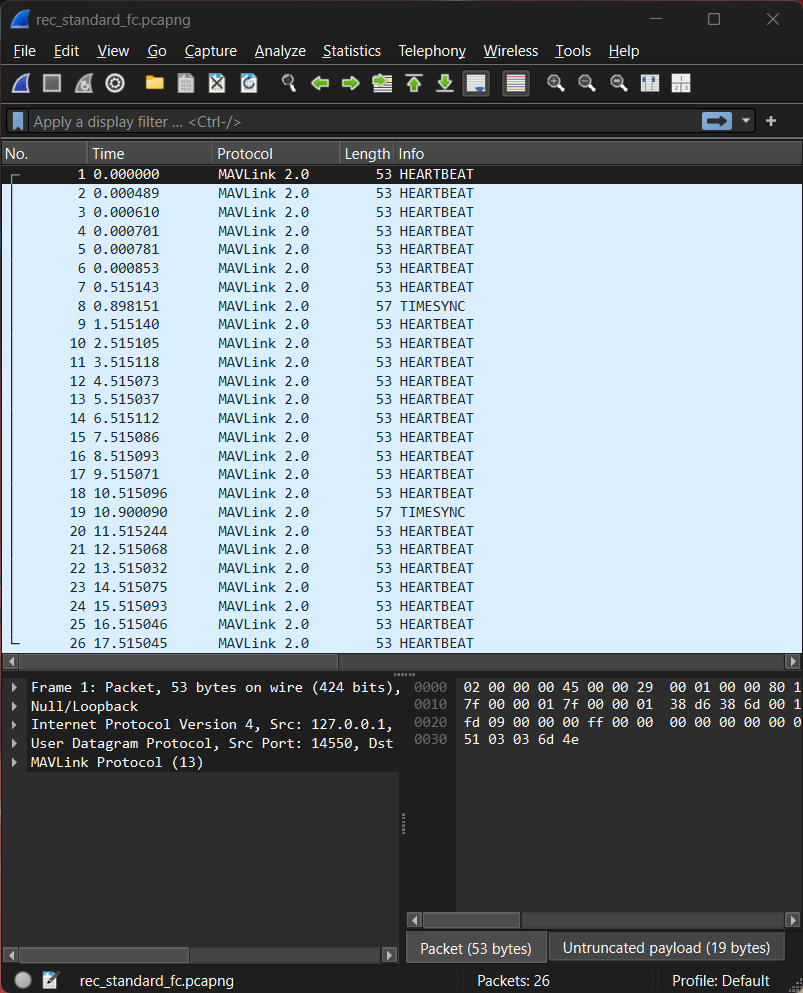
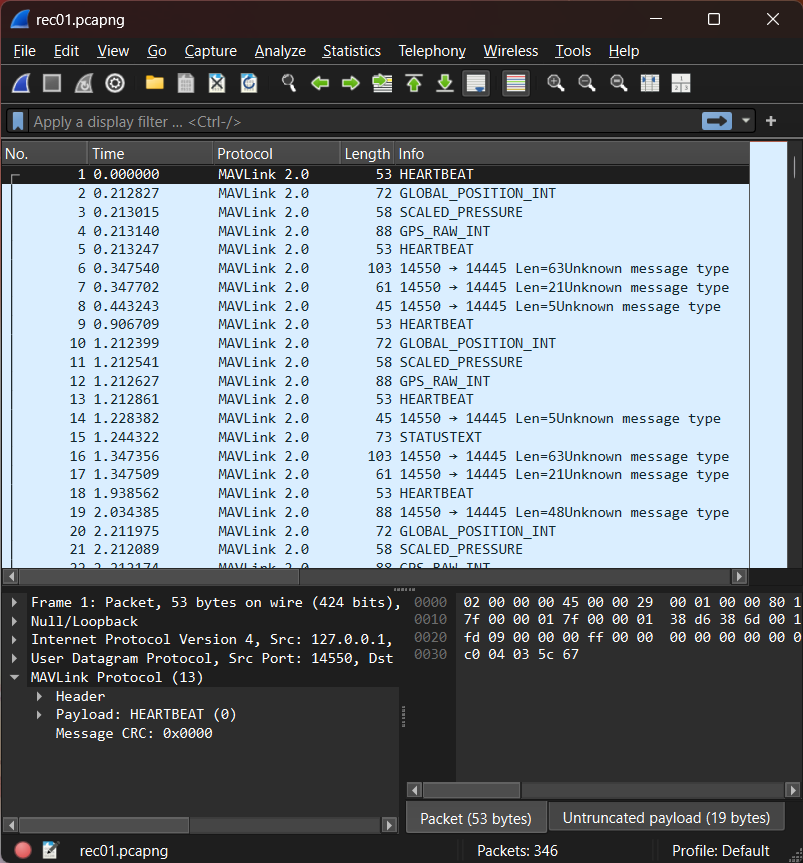
(Optional) Check the capture of flight controller communication in Wireshark
Example of the flight controller communication capture wirh Standard configuration shown in Wireshark
Example of the flight controller communication capture wirh OpenDroneID configuration shown in Wireshark
 note
noteTo open captures in Wireshark you can install MAVlink dissector using command
mavsniff wsplugin.
Step 2 – Capture communication from DRI to FC
-
Disconnect the FC temporarily.
-
Connect the USB–serial adapter RX line to the DRI’s Controller port TX line (= FC RX line position) and interconnect GND. Check DRI pinout.
-
Run mavsniff again to record the traffic.
- device is COMx port (Windows) or ttyUSBx/ttyACMx(Linux) to which the USB-serial adapter is connected. The 'x' denotes the number.
- baud is baudrate configured to the telemetry port, default is 115200. Yu can check it in DRI or FC configuration.
mavsniff capture --device COMx --file dri-to-fc --baud=115200Example of
mavsniff capture --device COMx --file rec_standard_fc --baud=115200output(This example is captured with Standard configuration.)
PS C:\Users\user> mavsniff capture -d COM4 --file C:/tools/rec_standard_fc --baud=115200
Capturing without packets limit - use ctrl+c to stop
INFO:mavsniff:captured 0, not-parsed: 0, empty: 0/s, bad: 0
INFO:mavsniff:captured 1, not-parsed: 0, empty: 281756/s, bad: 0
INFO:mavsniff:captured 2, not-parsed: 0, empty: 322805/s, bad: 0
INFO:mavsniff:captured 3, not-parsed: 0, empty: 326017/s, bad: 0
INFO:mavsniff:captured 4, not-parsed: 0, empty: 324438/s, bad: 0
INFO:mavsniff:captured 5, not-parsed: 0, empty: 324287/s, bad: 0
INFO:mavsniff:captured 6, not-parsed: 0, empty: 314790/s, bad: 0
INFO:mavsniff:captured 12, not-parsed: 0, empty: 325589/s, bad: 0
INFO:mavsniff:captured 13, not-parsed: 0, empty: 326602/s, bad: 0
INFO:mavsniff:captured 14, not-parsed: 0, empty: 327086/s, bad: 0
INFO:mavsniff:captured 15, not-parsed: 0, empty: 326854/s, bad: 0
INFO:mavsniff:captured 16, not-parsed: 0, empty: 324075/s, bad: 0
INFO:mavsniff:captured 17, not-parsed: 0, empty: 325127/s, bad: 0
INFO:mavsniff:captured 18, not-parsed: 0, empty: 322927/s, bad: 0
INFO:mavsniff:captured 19, not-parsed: 0, empty: 324839/s, bad: 0
INFO:mavsniff:captured 20, not-parsed: 0, empty: 317043/s, bad: 0
INFO:mavsniff:captured 21, not-parsed: 0, empty: 316889/s, bad: 0
INFO:mavsniff:captured 27, not-parsed: 0, empty: 322677/s, bad: 0
INFO:mavsniff:captured 28, not-parsed: 0, empty: 322770/s, bad: 0
INFO:mavsniff:captured 29, not-parsed: 0, empty: 323814/s, bad: 0
INFO:mavsniff:captured 30, not-parsed: 0, empty: 322598/s, bad: 0
INFO:mavsniff:captured 31 valid MAVLink packets
Example of
mavsniff capture --device COMx --file rec_opendroneid_dri --baud=115200output(This example is captured with OpenDroneID configuration.)
PS C:\Users\user> mavsniff capture -d COM4 --file C:/tools/rec_opendroneid_dri --baud=115200
Capturing without packets limit - use ctrl+c to stop
INFO:mavsniff:captured 0, not-parsed: 0, empty: 0/s, bad: 0
INFO:mavsniff:captured 2, not-parsed: 0, empty: 327419/s, bad: 0
INFO:mavsniff:captured 4, not-parsed: 0, empty: 349658/s, bad: 0
INFO:mavsniff:captured 6, not-parsed: 0, empty: 355615/s, bad: 0
INFO:mavsniff:captured 8, not-parsed: 0, empty: 354678/s, bad: 0
INFO:mavsniff:captured 10, not-parsed: 0, empty: 356924/s, bad: 0
INFO:mavsniff:captured 12, not-parsed: 0, empty: 355569/s, bad: 0
INFO:mavsniff:captured 14, not-parsed: 0, empty: 354788/s, bad: 0
INFO:mavsniff:captured 16, not-parsed: 0, empty: 354642/s, bad: 0
INFO:mavsniff:captured 23, not-parsed: 0, empty: 354713/s, bad: 0
INFO:mavsniff:captured 25, not-parsed: 0, empty: 352253/s, bad: 0
INFO:mavsniff:captured 27, not-parsed: 0, empty: 350362/s, bad: 0
INFO:mavsniff:captured 29, not-parsed: 0, empty: 352210/s, bad: 0
INFO:mavsniff:captured 31, not-parsed: 0, empty: 351390/s, bad: 0
INFO:mavsniff:captured 31 valid MAVLink packets
You can download Standard configuation example: Download example capture (rec_standard_dri.pcapng) You can download OpenDroneID configuration example: Download example capture (rec_opendroneid_dri.pcapng)
-
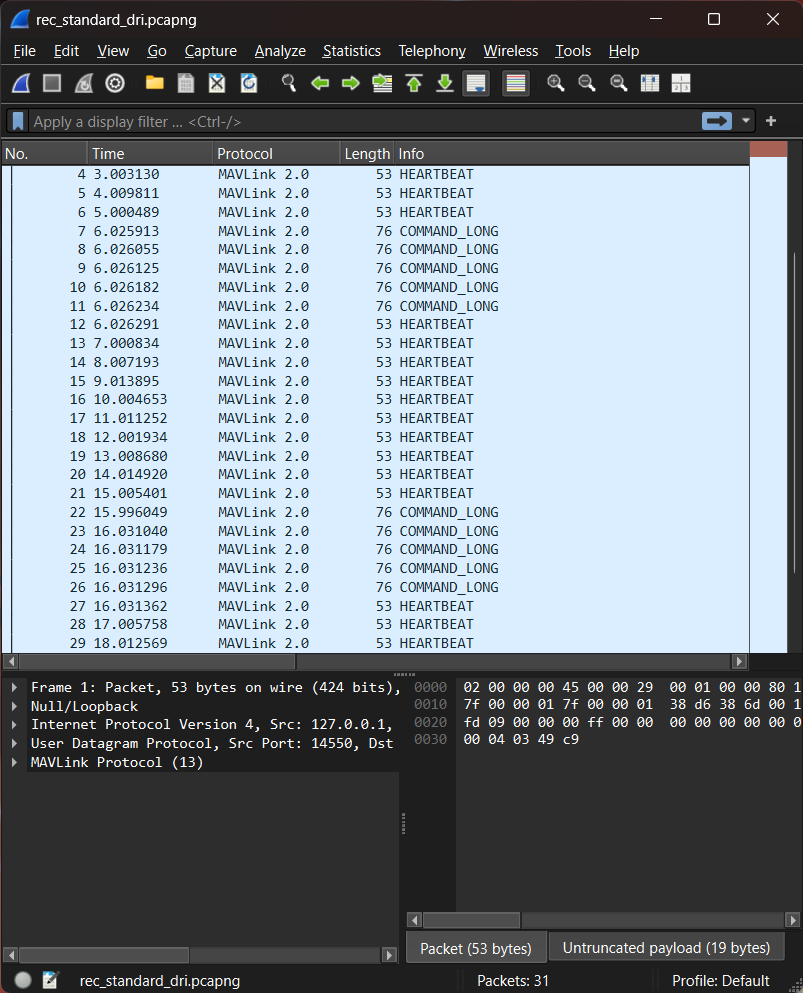
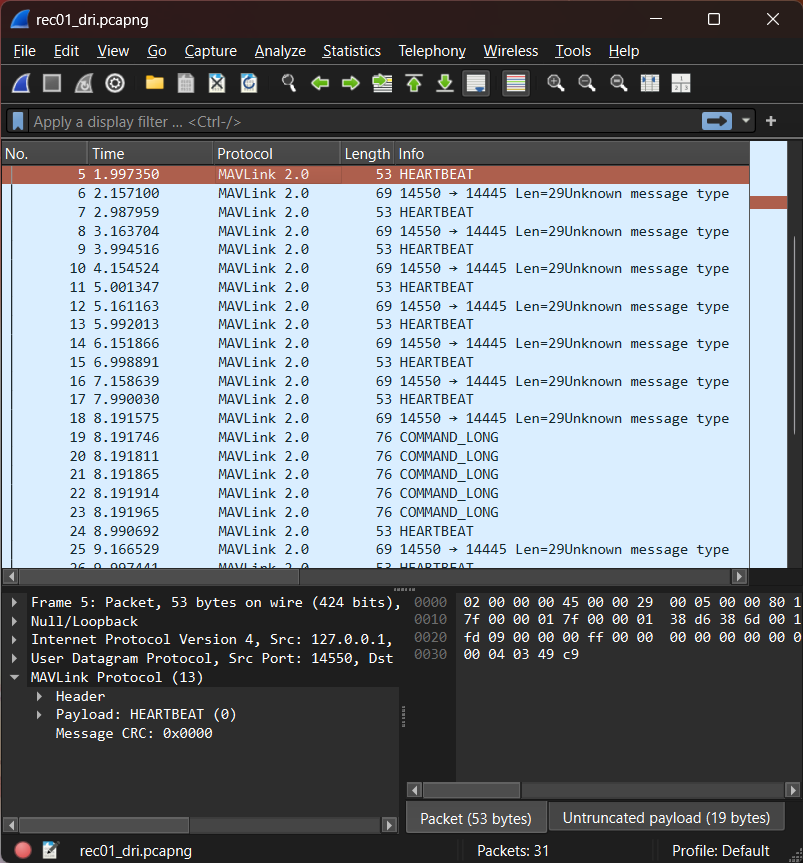
(Optional) Check the capture of Dronetag DRI communication in Wireshark
Example of the Dronetag DRI communication capture wirh Standard configuration shown in Wireshark
Example of the Dronetag DRI communication capture wirh OpenDroneID configuration shown in Wireshark
 note
noteTo open captures in Wireshark you can install MAVlink dissector using command
mavsniff wsplugin.
Step 3 – Contact the support
You will now have two .pcapng files, one for each direction, please attach them to your support request and send to support@dronetag.com.
Why capture both directions?
Capturing only FC - DRI shows what the Flight Controller is sending. It is required to check if telemetry port and MAVlink sending is configured correctly.
Capturing only DRI - FC shows its side of communication depending on it's state.
For effective troubleshooting, it is best to capture both directions.
Extras for advanced users
If you are technically skilled, you can capture the live bidirectional communication by wiring your USB–serial adapter RX pin first to the DRI RX line, and then to the DRI TX line in a second run. This requires:
- Use of measuring probes connected to RX and GND line of the USB-serial adapter
- or building a custom Y‑cable
- or soldering directly to the lines or to plated contacts under DRI telemetry connector (position corresponds to connector DRI pinout.).
- Understanding UART, DRI pinouts and safe wiring practices
Use the procedure described above to record the live communication this time without temporarily disconnecting either the Flight Controller (FC) or the DRI. In this way, the capture is complete and contains all the information required for proper diagnostics and speed up the diagnostics.
Once you have the .pcapng files, please attach them to your support request and send to support@dronetag.com.