Push Notifications
Make sure you're on the 2.227.0 app version or newer to access these features.
Dronetag app provides a range of notifications to keep you informed about your devices, flights, and airspace activity.
These include standard app notifications, such as device status or flight alerts, as well as Push Notifications for drone detection, which allow you to receive alerts even when the app is not actively running.
Detection Notifications
The Push Notifications system for drone detection devices supports Dronetag Scout and Dronetag RIDER, and lets you receive alerts even when the app is running in the background on iOS, Android, and Web.
Once enabled, you can set up your Scout or RIDER, close the app, and still be notified when a new aircraft is detected.
How to enable Detection Notifications
Before push notifications can work correctly, you first need to allow the Dronetag application to send notifications on your device.
For the web application, you also need to allow notifications in your web browser settings.
The Dronetag app should normally request this permission automatically on first use. However, it is possible that:
- the permission request was previously denied
- notifications are blocked by your browser settings
- notifications are restricted by company or system policies on your computer
Chrome
Settings → Privacy and security → Site Settings → Notifications
Edge
Settings → Privacy, search, and services → Site permissions → All permissions → Notifications
Firefox
Settings → Privacy & Security → Notifications
Safari
Settings → Websites → Notifications
1. Update the app to v2.227.0 or newer.
2. Navigate to Notifications settings
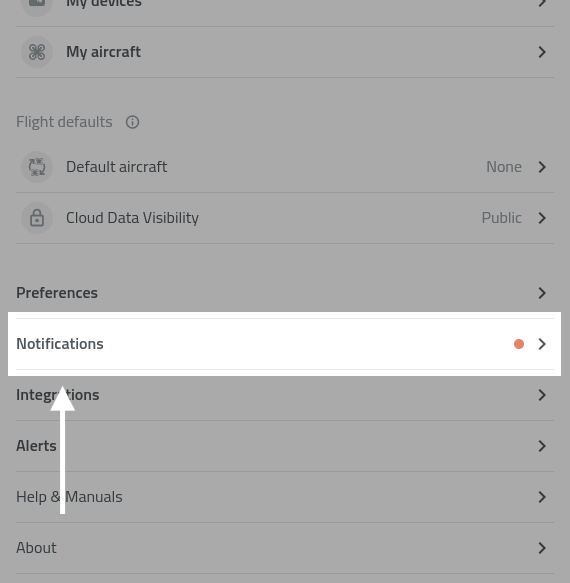
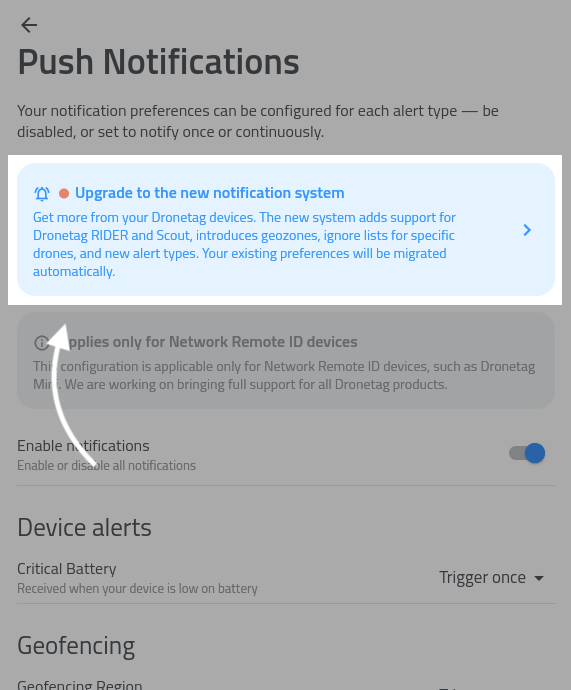
3. Open Notification settings and tap to a blue Upgrade box.
- If the blue box is not visible, log out and log back in to refresh your account settings.
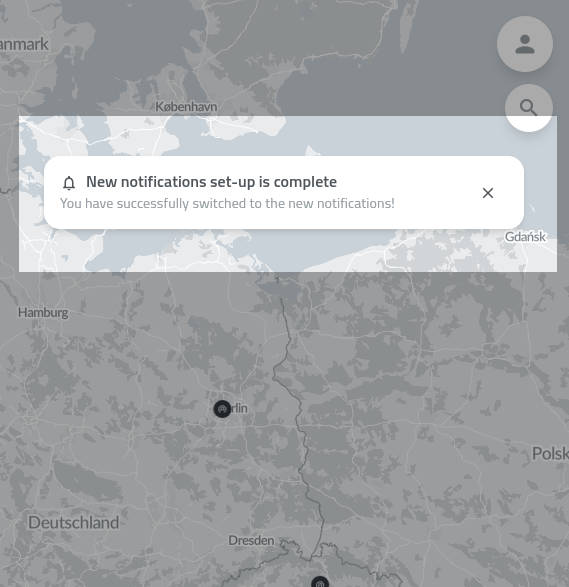
4. App will confirm the setup process was succesfull:
5. Now check the notifications setup is set to your actual needs.
- Push Notifications are available on Web, iOS, and Android.
- If you are signed in on multiple devices, you can enable notifications on each one independently.
- Make sure OS notification permissions are granted before enabling notifications in the app.
List of features
Find a detailed list of detection-related features below:
Notification Regions
Notification regions let you limit detection alerts to specific geographic areas. For example, you can define a region around a building and only receive alerts when a drone is detected within that area.
The app does not yet include a built-in visual editor for regions in early access. We recommend using geojson.io to create and edit regions – you can draw a polygon or circle, export it as GeoJSON, and paste the result into the app.
How to set up a notification region:
- Open Notification settings.
- Select Manage notification regions.
- Tap the + button to add a new region.
- Enter a name for the region and paste the GeoJSON content into the text field.
- Tap Save.
- ☝️ Enable the "Restrict notifications to defined regions" toggle in Notification settings. This is the main switch that controls whether your defined regions are applied – without it, you will receive notifications from all areas regardless of any regions you have set up.
You can edit, temporarily disable, or delete regions at any time. All regions are also shown on the map for easy reference.
Enabling "Restrict notifications to defined regions" applies globally. If a device has no specific regions defined, it will stop sending notifications entirely. Ensure all your devices have designated regions to maintain coverage.
Ignore Lists
The ignore list lets you suppress notifications for specific drones. Once a UAS ID, most often a drone or module serial number, is added, you will no longer receive alerts for that drone.
How to add a drone to the ignore list:
- Open Notification settings.
- Select Manage ignored UAS IDs.
- Enter the UAS ID, usually the drone serial number, and tap Add to ignore list.
You can add as many UAS IDs as needed and remove them at any time.
Sound and Visual Effects
Detection notifications produce in-app sound and visual effects on your device while the app is open, similar to the older Alerts functionality.
To configure these effects, tap the preferences icon next to the New detection alerts category in Notification settings.
When the app is closed, the notification sound follows your system settings.
Notifications history
You can view past detection alerts in the Notification history screen for later review.
Other Notifications in Dronetag App
In addition to detection alerts, the app provides several other notification types to keep you informed about your devices and operations.
Shared Devices Notifications
Receive updates related to devices shared with you. This includes activity and events from devices operated by other users within your shared environment.
Detection Notifications
Get notified whenever a new aircraft is detected in your vicinity when using the app in the foreground.
NRI Flight Notifications
Notifications related to your own flights using Network Remote ID devices.
- Proximity alerts – when another aircraft gets too close
- Altitude alerts – when your device exceeds a defined altitude threshold, for example 120 m
Device Notifications
Stay informed about the status of your devices.
- Low battery warning – when a device is running low on battery
- Error status – when a device encounters an issue
Account Notifications
Updates related to your account, such as changes in settings or important account-related events.
This feature is still in development and may be unstable.
If you encounter any issues or have feedback, please contact your representative or reach out to our support team.
We are continuing to expand the Push Notifications system. Coming soon:
- ⭐️ SMS & e-mail notifications
- Visual editor for notification regions
- Sharing notification regions with other users