Quick Start
The On-Premise Tablet is a ready-to-use hardware solution, typically used for evaluation purposes.
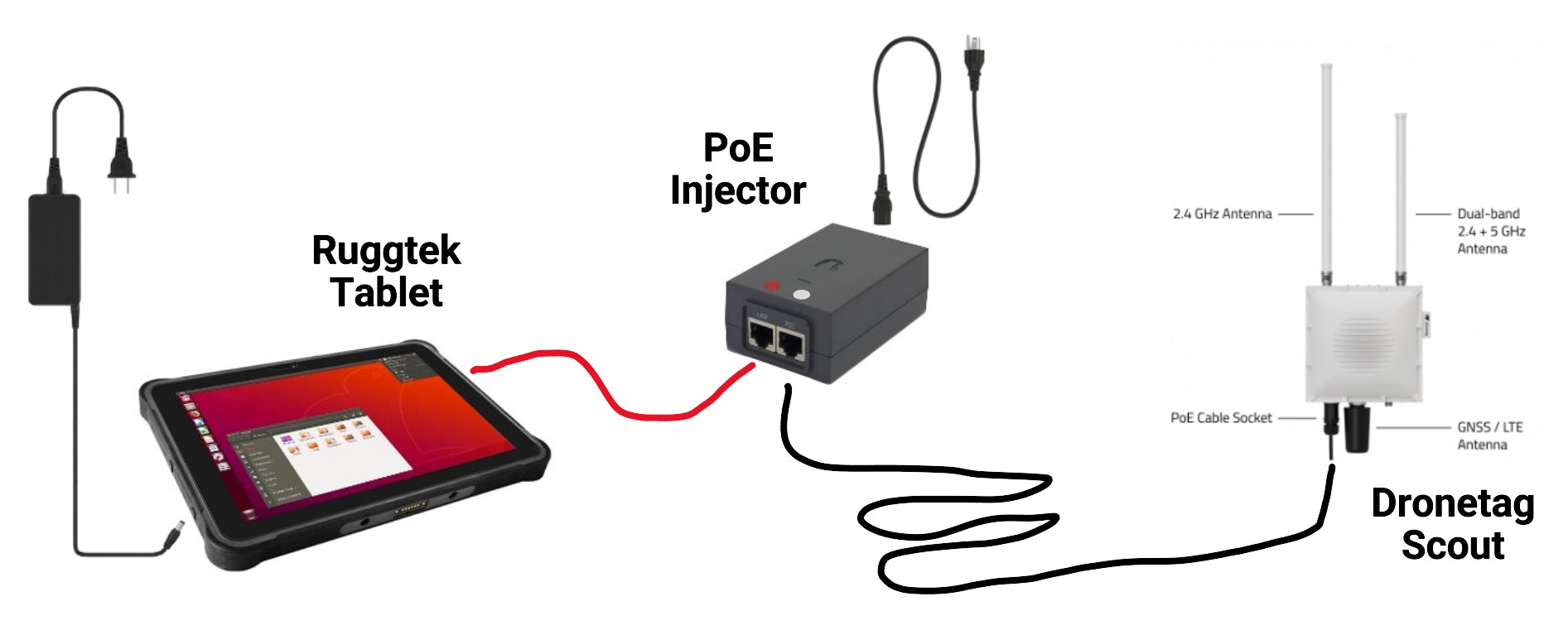
Note that the tablet is not just a graphical display. It is a Linux server with pre-installed Dronetag On-Premise Platform. If connected to a network, it provides an HTTP server to serve the application to web browsers.
1. Set-up the On-Premise Tablet
- Connect the power source and ethernet cable to ports located at the left edge of the tablet.
- Connect Dronetag Scout with the tablet. As Dronetag Scout needs Power-over-Ethernet, it is necessary to plug a PoE injector (provided) between the two devices.
- Make sure that the tablet is connected to the slot marked "LAN", while Dronetag Scout is connected to the slot marked "PoE".
- Press the power button on the top.
- Wait for the system to boot up and show a graphical map.
2. Check that the setup is working
If the devices are connected correctly, you should see a small banner in the top-left corner of the screen, showing a green dot and 1 online.
References
- The guide on configuring your Dronetag Scout.
- The guide on accessing the web app to visualize the data you have captured.
- Please note that the On-Premise version of Dronetag App is limited and many functions described in the guide are missing there.